openshift service mesh 구성이 되었으면,
https://fullmooney.tistory.com/66
Openshift service mesh (istio)
openshift 환경에 service mesh 환경을 구성한다. istio operator를 Red Hat OpenShift Service Mesh operator라는 이름으로 제공하고 있다.서비스메시가 설치된 네임스페이스외의 다른 네임스페이스를 서비스메시
fullmooney.tistory.com
이제 gateway, virtual service를 생성하자.
웹콘솔에서 관리자 > 관리 > 사용자 지정 리소스 정의로 이동하여 Gateway 선택후 인스턴스 탭으로 이동한다.
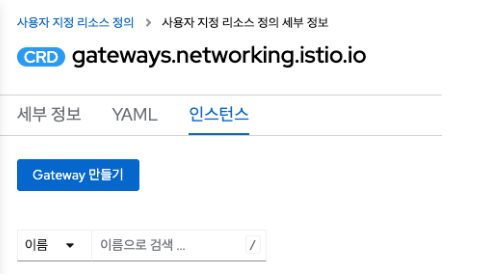
Gateway 만들기 버튼을 클릭하여 사용할 도메인의 gateway를 생성한다.
apiVersion: networking.istio.io/v1beta1
kind: Gateway
metadata:
  name: app-gateway
  namespace: mesh-project
spec:
  selector:
    istio: ingressgateway
  servers:
    - hosts:
        - app.my-domain.com # 사용할 도메인 입력
      port:
        name: http
        number: 80
        protocol: HTTP
이제 Virtual Service도 동일한 방법으로 리소스 검색 후 인스턴스 생성한다.
apiVersion: networking.istio.io/v1beta1
kind: VirtualService
metadata:
  name: app-virtual-service
  namespace: mesh-project
spec:
  gateways:
    - app-gateway # 사용 게이트웨이 리스트
  hosts:
    - app.my-domain.com # 사용 도메인 리스트
  http:
    - match:
        - uri:
            prefix: / # context-path 기준. 다양한 matching 방법이 있으므로 공식 문서 참고한다.
      route:
        - destination:
            host: app.app-project.svc.cluster.local
            port:
              number: 8080
virtual service관련 참고
https://istio.io/latest/docs/reference/config/networking/virtual-service/
Virtual Service
Configuration affecting label/content routing, sni routing, etc.
istio.io
인스턴스가 생성되면서 Router가 자동 생성된 것을 확인할 수 있다.
http로 테스트 가능하고, 인증서를 router에 추가하여 https 설정을 하면 된다.
이제 egress로 외부 서비스호출을 위한 설정을 해보자.
NetNamespace와 HostSubnet에 egressIP 관 설정이 되어있다는 가정하에 진행한다.
service mesh가 구성된 상태에서는 EndPoitnt, Service에 추가로 ServiceEntry를 설정해준다.
yaml 예시이다.
apiVersion: networking.istio.io/v1beta1
kind: ServiceEntry
metadata:
  name: external-svc
  namespace: app-project
spec:
  endpoints:
    - address: 211.183.xx.xx # 외부의 IP
  hosts:
    - external-svc # 외부 IP에 매칭시킬 내부 서비스 도메인
  location: MESH_EXTERNAL
  ports:
    - name: tcp
      number: 9900
  resolution: DNS # STATIC 설정시 IP가 고정되어 바뀌지 않는 경우

---

kind: Service
apiVersion: v1
metadata:
  name: external-svc
  namespace: app-project
spec:
  ports:
    - protocol: TCP
      port: 9900
      targetPort: 9900
  clusterIP: None
  clusterIPs:
    - None
  type: ClusterIP
  sessionAffinity: None
  ipFamilies:
    - IPv4
    - IPv6
  ipFamilyPolicy: RequireDualStack
  internalTrafficPolicy: Cluster

---
kind: Endpoints
apiVersion: v1
metadata:
  name: external-svc
  namespace: app-project
subsets:
  - addresses:
      - ip: 211.183.xx.xx
    ports:
      - port: 9900
        protocol: TCP
이제 app 내부에서 http://external-svc:9900 호출하면 연결된 외부 서비스에 설정한 egressIP로 나가는 것을 볼 수 있다.
'CloudNative > Orchestration & Management' 카테고리의 다른 글
| Openshift service mesh (istio) (0) | 2024.11.09 |
|---|---|
| metallb (1) | 2024.04.12 |
| Windows11 + docker desktop k8s 에 SCDF UI 설치 (1) | 2023.09.13 |