동기 통신이다. 우선 resttemplate 를 써보자
환경은 다음과 같다.
- springboot 2.7.18
- jdk 11.0.21
dependency를 추가한다.
<!-- pom.xml -->
<dependency>
    <groupId>org.springframework.boot</groupId>
    <artifactId>spring-boot-starter-web</artifactId>
</dependency>
공통화를 위해 우선 interceptor를 만들어보자.
ClientHttpRequestInterceptor를 구현하는 HttpClientRequestInterceptor 클래스를 생성하여 req, res에 대해 로깅을 준비한다.
@Slf4j
public class HttpClientRequestInterceptor implements ClientHttpRequestInterceptor {

    @Override
    public ClientHttpResponse intercept(HttpRequest request, byte[] body, ClientHttpRequestExecution execution)
	    throws IOException {
	logReq(request.getURI(), body);
	ClientHttpResponse response = execution.execute(request, body);
	logRes(request.getURI(), response);
	return response;
    }

    private void logReq(URI requestUri, byte[] body) throws IOException {
	if (log.isInfoEnabled()) {
	    log.info("- URI : {}", requestUri);
	    log.info("- request body : {}", new String(body, StandardCharsets.UTF_8));
	}
    }

    private void logRes(URI requestUri, ClientHttpResponse response) throws IOException {
	if (log.isInfoEnabled()) {
	    log.info("- URI : {}", requestUri);
	    log.info("- Response statuscode : {} ", response.getStatusCode());
	    log.info("- Response body : {} ", IOUtils.toString(response.getBody(), StandardCharsets.UTF_8));
	}
    }

}
이제 exception 처리 용 ResponseErrorHanlder를 구현하는 RestTemplateErrorHandler 클래스를 생성해보자.
4xx, 5xx 발생시 Exception throw를 한다.
@Slf4j
public class RestTemplateErrorHandler implements ResponseErrorHandler {

    @Override
    public boolean hasError(ClientHttpResponse httpResponse) throws IOException {
	return httpResponse.getStatusCode().series() == HttpStatus.Series.CLIENT_ERROR //4xx
		|| httpResponse.getStatusCode().series() == HttpStatus.Series.SERVER_ERROR; //5xx
    }

    @Override
    public void handleError(ClientHttpResponse httpResponse) throws IOException {

	String errorStr = IOUtils.toString(httpResponse.getBody(), StandardCharsets.UTF_8);
	log.debug("handleError statusCode: {}", httpResponse.getStatusCode().value());
	log.debug("handleError errorStr: {}", errorStr);
	if (httpResponse.getStatusCode().series() == HttpStatus.Series.SERVER_ERROR
		|| httpResponse.getStatusCode().series() == HttpStatus.Series.CLIENT_ERROR) {
        //FIXME 각각에 대한 custom exception설정이 필요한 경우 이 부분을 수정한다.
	    throw new RuntimeException(errorStr);
	}
    }

}
이제 resttemplate configuration을 위한 RestTemplateConfig 클래스를 생성한다.
HttpClient와 HttpComponentClientHttpRequestFactory Bean을 등록하고 global한 timeout 을 설정한다.
http://localhost:8080/로 자기 자신의 api call 을 위한 SelfRestTemplate bean 함께 생성한다.
@Configuration
public class RestTemplateConfig {

    @Value("${target.self:http://localhost:8080}")
    private String targetSelf;

    @Bean
    HttpClient httpClient() throws KeyStoreException, NoSuchAlgorithmException, KeyManagementException {
	TrustStrategy acceptingTrustStrategy = (X509Certificate[] chain, String authType) -> true;
	SSLContext sslContext = new SSLContextBuilder().loadTrustMaterial(null, acceptingTrustStrategy).build();
	SSLConnectionSocketFactory csf = new SSLConnectionSocketFactory(sslContext);
	return HttpClientBuilder.create().setMaxConnTotal(200).setMaxConnPerRoute(100) // IP:포트별 최대 커넥션 수
		.setConnectionTimeToLive(30, TimeUnit.SECONDS) // keep-alive
		.setSSLSocketFactory(csf).build();
    }

    @Bean
    HttpComponentsClientHttpRequestFactory factory(HttpClient httpClient) {
	HttpComponentsClientHttpRequestFactory httpComponentsClientHttpRequestFactory = new HttpComponentsClientHttpRequestFactory(
		httpClient);
	httpComponentsClientHttpRequestFactory
		.setConnectionRequestTimeout(3); // 3s
	httpComponentsClientHttpRequestFactory.setConnectTimeout(3000); // 3s
	httpComponentsClientHttpRequestFactory.setReadTimeout(30000); // 30s
	return httpComponentsClientHttpRequestFactory;
    }

    @Bean("selfRestTemplate")
    RestTemplate selfRestTemplate(RestTemplateBuilder restTemplateBuilder,
	    HttpComponentsClientHttpRequestFactory factory) {
	return restTemplateBuilder.rootUri(targetSelf)
		.additionalMessageConverters(new StringHttpMessageConverter(StandardCharsets.UTF_8),
			new MappingJackson2HttpMessageConverter())
		.setConnectTimeout(Duration.ofSeconds(3)).setReadTimeout(Duration.ofSeconds(30))
		.interceptors(new HttpClientRequestInterceptor()).errorHandler(new RestTemplateErrorHandler())
		.customizers(
			restTemplate -> restTemplate.setRequestFactory(new BufferingClientHttpRequestFactory(factory)))
		.defaultHeader("organization", "supermoon")
		.build();
    }

}
RestClient를 만든다. JSON 포멧으로 통신하도록 contentType을 지정하고, HttpEntity 를 생성하여 restTemplate의 exchange 메소드에 전달한다.
@Component
public class SelfRestClient {

    private final RestTemplate selfRestTemplate;

    public SelfRestClient(@Qualifier("selfRestTemplate") RestTemplate selfRestTemplate) {
	this.selfRestTemplate = selfRestTemplate;
    }

    @SuppressWarnings("unchecked")
    public <T> T get(String uri, Object obj, Class<?> clazz) {
	HttpEntity<?> httpEntity = makeHttpHeader(HttpMethod.GET, obj);
	return (T) selfRestTemplate.exchange(uri, HttpMethod.GET, httpEntity, clazz);
    }

    @SuppressWarnings("unchecked")
    public <T> T post(String uri, Object obj, Class<?> clazz) {
	HttpEntity<?> httpEntity = makeHttpHeader(HttpMethod.POST, obj);
	return (T) selfRestTemplate.exchange(uri, HttpMethod.POST, httpEntity, clazz);
    }

    @SuppressWarnings("deprecation")
    private HttpHeaders makeHeader() {
	HttpHeaders httpHeaders = new HttpHeaders();
	httpHeaders.setContentType(MediaType.APPLICATION_JSON_UTF8);
	httpHeaders.setAccept(Collections.singletonList(MediaType.APPLICATION_JSON));
	return httpHeaders;
    }

    private HttpEntity<?> makeHttpHeader(HttpMethod httpMethod, Object param) {
	HttpHeaders httpHeaders = makeHeader();
	return httpMethod == HttpMethod.GET ? new HttpEntity<>(httpHeaders) : new HttpEntity<>(param, httpHeaders);
    }
}
이제 테스트를 해보자.
테스트 호출용, 응답용 API를 만든다.
@RestController
@RequestMapping("/api/rest")
public class RestTemplateTestController {

    private final SelfRestClient selfRestClient;

    public RestTemplateTestController(SelfRestClient selfRestClient) {
	this.selfRestClient = selfRestClient;
    }

    @GetMapping("/return-get-value/{number}")
    public ResponseEntity<EventVO> returnGetValue(@PathVariable("number") int number) {

	EventVO event = new EventVO();
	event.setName("GetTest");
	event.setNumber(number);
	return ResponseEntity.ok(event);
    }

    @PostMapping("/return-post-value")
    public ResponseEntity<EventVO> returnPostValue(@RequestBody EventVO event) {

	event.setWage(1000000);
	return ResponseEntity.ok(event);
    }

    @PostMapping("/call-get-value")
    public ResponseEntity<EventVO> callGetValue(@RequestBody EventVO event) {

	return selfRestClient.get("/api/rest/return-get-value/11", null, EventVO.class);
    }

    @PostMapping("/call-post-value")
    public ResponseEntity<EventVO> callPostValue(@RequestBody EventVO event) {

	return selfRestClient.post("/api/rest/return-post-value", event, EventVO.class);
    }

}
swagger로 호출해본다.
먼저 post요청이다.
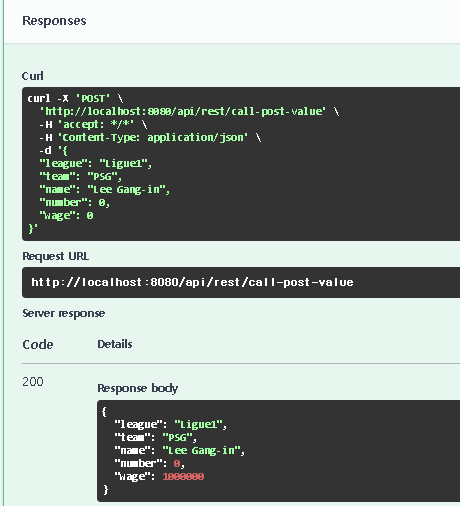
정상 응답을 받았다.
다음 get요청 또한 정상응답을 받는다.

콘솔에서 인터셉터가 잘 찍혔는지 확인해보니 잘 찍혔다.



마지막으로 없는 주소를 호출해본다. 스웨거 응답에는 익셉션이 찍혔다.

콘솔창에서도 확인해본다. 에러핸들러에 설정한 내용이 잘 찍혔다.

Git: sync/rest at dev · FullMooney/sync (github.com)
'개발 > java' 카테고리의 다른 글
| @Aspect로 공통header 처리 (2) | 2024.02.19 |
|---|---|
| springboot threadLocal 테스트 (1) | 2024.01.22 |
| springboot rabbitmq config와 DLQ 예제 (0) | 2024.01.18 |
| springboot + redis @Cacheable 사용 (3) | 2024.01.11 |
| springboot redis client 만들기 (1) | 2024.01.08 |