redis @cacheable를 써보자
환경은 다음과 같다
- springboot 2.7.18
- jdk 11.0.21
잘 변하지 않는 데이터에 대해서 @Cacheable을 통해 DB , API호출이나 로직 수행을 하지 않고, redis cache에 저장된 값으로 즉각적으로 응답을 줄 수 있다.
springboot redis 기본 구성은 이전 게시물을 참조하자
https://fullmooney.tistory.com/27
springboot + redis 사용하기
redis를 써보자 환경은 다음과 같다 springboot 2.7.18 jdk 11.0.21 먼저 pom 에 dependency를 추가한다. org.springframework.boot spring-boot-starter-data-redis io.lettuce lettuce-core redis와 redisinsight 로컬 환경 구성(windows 기준
fullmooney.tistory.com
RedisConfig에 이어 CacheConfig를 추가로 설정한다.
org.springframework.cache.annotation.CachingConfigurerSupport 를 상속받고 @EnableCaching 을 Configuration 클래스에 추가한다.
아래 설정을 통해 @Cacheable을 통해 redis에 등록된 캐시는 prefix로 com이 붙게 되며 cache name과 추가 key를 append 하여 com::<CacheName>::<key> 형태의 Redis Key를 갖게 된다.
//RedisCacheConfig.java
import java.time.Duration;
import java.util.Map;
import java.util.TreeMap;

import javax.annotation.PostConstruct;

import org.springframework.beans.factory.annotation.Value;
import org.springframework.cache.annotation.CachingConfigurerSupport;
import org.springframework.cache.annotation.EnableCaching;
import org.springframework.cache.interceptor.CacheErrorHandler;
import org.springframework.context.annotation.Bean;
import org.springframework.context.annotation.Configuration;
import org.springframework.data.redis.cache.CacheKeyPrefix;
import org.springframework.data.redis.cache.RedisCacheConfiguration;
import org.springframework.data.redis.cache.RedisCacheManager;
import org.springframework.data.redis.connection.RedisConnectionFactory;
import org.springframework.data.redis.serializer.GenericJackson2JsonRedisSerializer;
import org.springframework.data.redis.serializer.RedisSerializationContext;
import org.springframework.data.redis.serializer.StringRedisSerializer;
import org.springframework.util.StringUtils;

import com.dev.common.handler.CacheExceptionHandler;
import com.fasterxml.jackson.annotation.JsonInclude.Include;
import com.fasterxml.jackson.annotation.JsonTypeInfo;
import com.fasterxml.jackson.core.JsonGenerator;
import com.fasterxml.jackson.databind.DeserializationFeature;
import com.fasterxml.jackson.databind.ObjectMapper;
import com.fasterxml.jackson.databind.jsontype.impl.LaissezFaireSubTypeValidator;

import lombok.extern.slf4j.Slf4j;

@Slf4j
@EnableCaching
@Configuration
public class RedisCacheConfig extends CachingConfigurerSupport {

    public static final String CKEY = "CKEY";

    private final ObjectMapper objectMapper;
    private final RedisConnectionFactory redisConnectionFactory;


    private CacheKeyPrefix cacheKeyPrefix;

    @Value("${spring.cache.redis.key-prefix:com}")
    private String springCacheRedisKeyPrefix;

    @Value("${spring.cache.redis.use-key-prefix:true}")
    private boolean springCacheRedisUseKeyPrefix;


    public RedisCacheConfig(ObjectMapper objectMapper, RedisConnectionFactory redisConnectionFactory) {
        this.objectMapper = objectMapper;
        this.redisConnectionFactory = redisConnectionFactory;
    }


    @PostConstruct
    private void onPostConstructor() {
        if (springCacheRedisUseKeyPrefix && StringUtils.hasText(springCacheRedisKeyPrefix)) {
            cacheKeyPrefix = cacheName -> springCacheRedisKeyPrefix.trim() + "::" + cacheName + "::";
        } else {
            cacheKeyPrefix = CacheKeyPrefix.simple();
        }
    }


    @Bean
    RedisCacheManager redisCacheManager() {
        try {
            RedisCacheConfiguration redisCacheConfiguration = forJsonConfig();

            return RedisCacheManager.RedisCacheManagerBuilder
                    .fromConnectionFactory(redisConnectionFactory)
                    .cacheDefaults(redisCacheConfiguration)
		    .withInitialCacheConfigurations(comConfigurationMap())
                    .build();
        } catch(Exception e) {
            log.error("redisCacheManager create Exception", e);
        }

        return null;
    }

    private RedisCacheConfiguration forJsonConfig() {
        ObjectMapper objectMapperForRedisCache = objectMapper.copy();
        objectMapperForRedisCache.setSerializationInclusion(Include.NON_NULL);
        objectMapperForRedisCache.enable(JsonGenerator.Feature.IGNORE_UNKNOWN);
        objectMapperForRedisCache.disable(DeserializationFeature.FAIL_ON_UNKNOWN_PROPERTIES);
        objectMapperForRedisCache.activateDefaultTyping(LaissezFaireSubTypeValidator.instance, ObjectMapper.DefaultTyping.NON_FINAL, JsonTypeInfo.As.WRAPPER_ARRAY);

        GenericJackson2JsonRedisSerializer jsonSerializer = new GenericJackson2JsonRedisSerializer(objectMapperForRedisCache);

        return RedisCacheConfiguration.defaultCacheConfig()
                .serializeKeysWith  (RedisSerializationContext.SerializationPair.fromSerializer(new StringRedisSerializer()))
                .serializeValuesWith(RedisSerializationContext.SerializationPair.fromSerializer(jsonSerializer))
                .computePrefixWith(cacheKeyPrefix)
                ;
    }

    private Map<String, RedisCacheConfiguration> comConfigurationMap() {
        Map<String, RedisCacheConfiguration> map = new TreeMap<>();

	map.put(CKEY, forJsonConfig().entryTtl(Duration.ofSeconds(60)));

        return map;
    }

    @Override
    public CacheErrorHandler errorHandler() {
	return new CacheExceptionHandler();
    }

}
CacheExceptionHandler 는 CacheErrorHandler를 구현하는데, redis에 cache가 조회되지 않는 경우에도 정상적으로 서비스가 동작할 수 있도록 로깅만 처리하도록 한다.
//CacheExceptionHandler.java
import org.springframework.cache.Cache;
import org.springframework.cache.interceptor.CacheErrorHandler;

import lombok.extern.slf4j.Slf4j;

@Slf4j
public class CacheExceptionHandler implements CacheErrorHandler {

    @Override
    public void handleCacheGetError(RuntimeException exception, Cache cache, Object key) {
        log.error("{}", exception.getMessage());
        log.error("{}", exception.toString());
    }

    @Override
    public void handleCachePutError(RuntimeException exception, Cache cache, Object key, Object value) {
        log.error("{}", exception.getMessage());
        log.error("{}", exception.toString());
    }

    @Override
    public void handleCacheEvictError(RuntimeException exception, Cache cache, Object key) {
        log.error("{}", exception.getMessage());
        log.error("{}", exception.toString());
    }

    @Override
    public void handleCacheClearError(RuntimeException exception, Cache cache) {
        log.error("{}", exception.getMessage());
        log.error("{}", exception.toString());
    }

}
이제 테스트를 위한 api와 서비스를 작성한다.
//RedisTestController.java -- api 추가
	@GetMapping("/get-cacheable-val/{key}")
    public ResponseEntity<String> getCacheableVal(@PathVariable(name = "key") String key) {

	String val = cacheService.getCacheableVal(key);
	log.debug("cached val is == {}", val);

	return ResponseEntity.ok(val);
    }

//CacheServiceImpl.java -- CacheService interface는 생략
import java.util.Date;

import org.springframework.cache.annotation.Cacheable;
import org.springframework.stereotype.Service;

import com.dev.common.config.RedisCacheConfig;
import com.dev.demo.service.CacheService;

import lombok.extern.slf4j.Slf4j;

@Slf4j
@Service
public class CacheServiceImpl implements CacheService {

    @SuppressWarnings("deprecation")
    @Cacheable(cacheNames = RedisCacheConfig.CKEY, key = "#key", unless = "#result==null")
    @Override
    public String getCacheableVal(String key) {
	// TODO DB 조회 또는 API 호출
	Date dt = new Date();
	int sec = dt.getSeconds();
	log.debug("{}", sec);
	for (int i = 0; i < 100; i++) {
	    if (i == sec) { //호출 시점의 second와 일치하는 값을 출력하고 리턴
		log.debug("i== {}", i);
		return String.valueOf(i);
	    }
	}
	return null;
    }

}
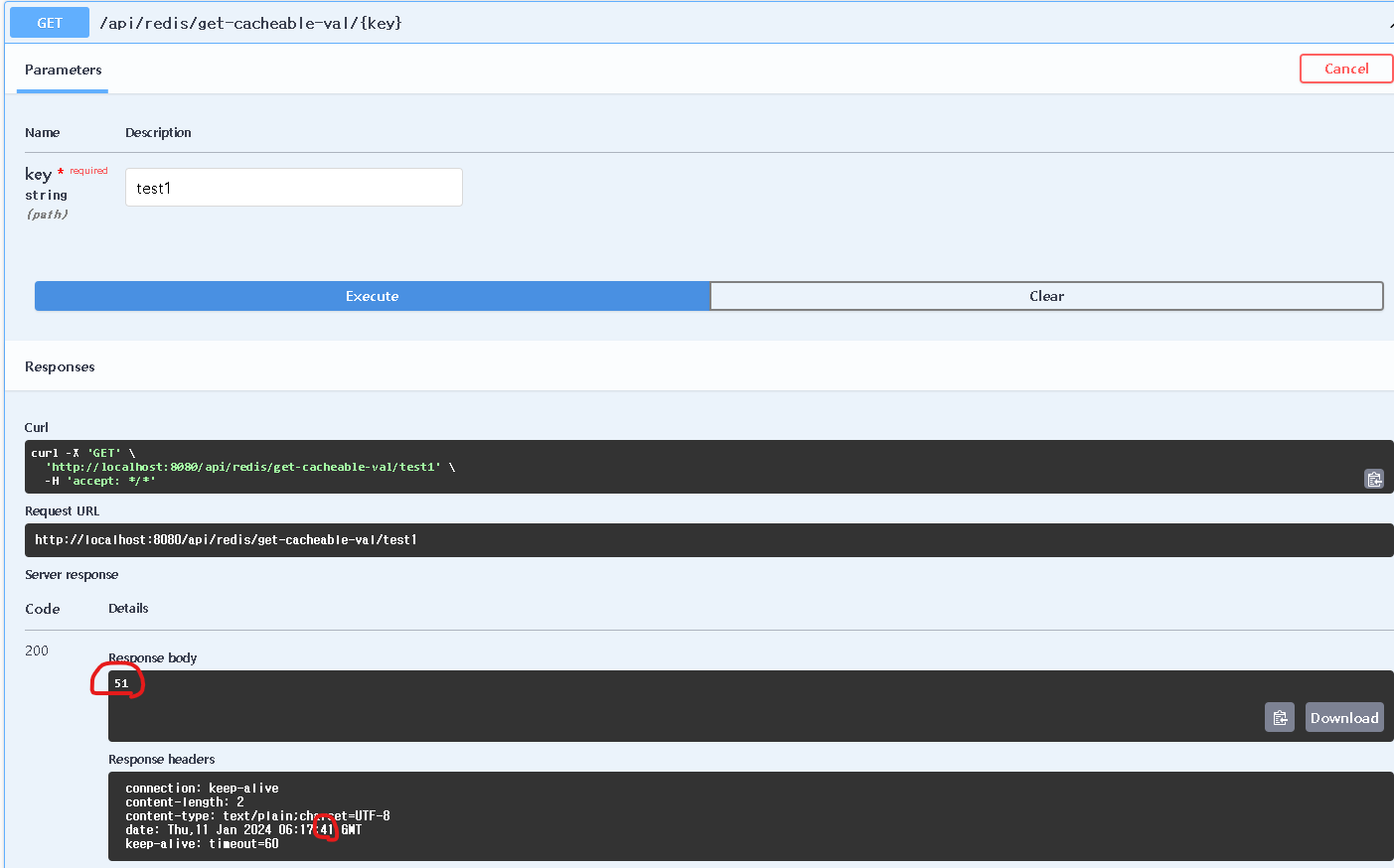
테스트를 위해 swagger를 통해 2회 호출해보자.
최초 호출시 51초에 51이라는 값이 정상적으로 리턴되었다.

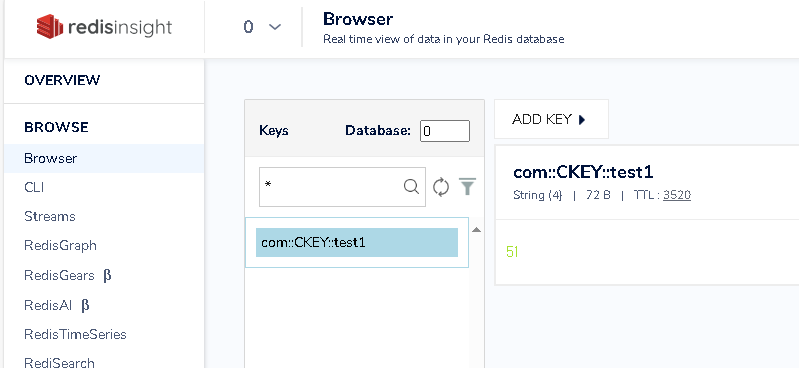
redis insight를 통해서도 redis에 com:CKEY:test1 이라는 키 값에 51이 설정되어있다.
다시 호출해보자.
41초에 호출하였는데 51이라는 값이 동일하게 응답되고
몇번을 하더라도 동일한 결과가 리턴된다.
콘솔 로그에서도 CacheServiceImpl에서 로깅한 내용은 1회 호출에서만 찍히고,
2회차부터는 Controller에서 response를 주기직전에 logging 한 내용만 찍히는 것을 확인할 수 있다.
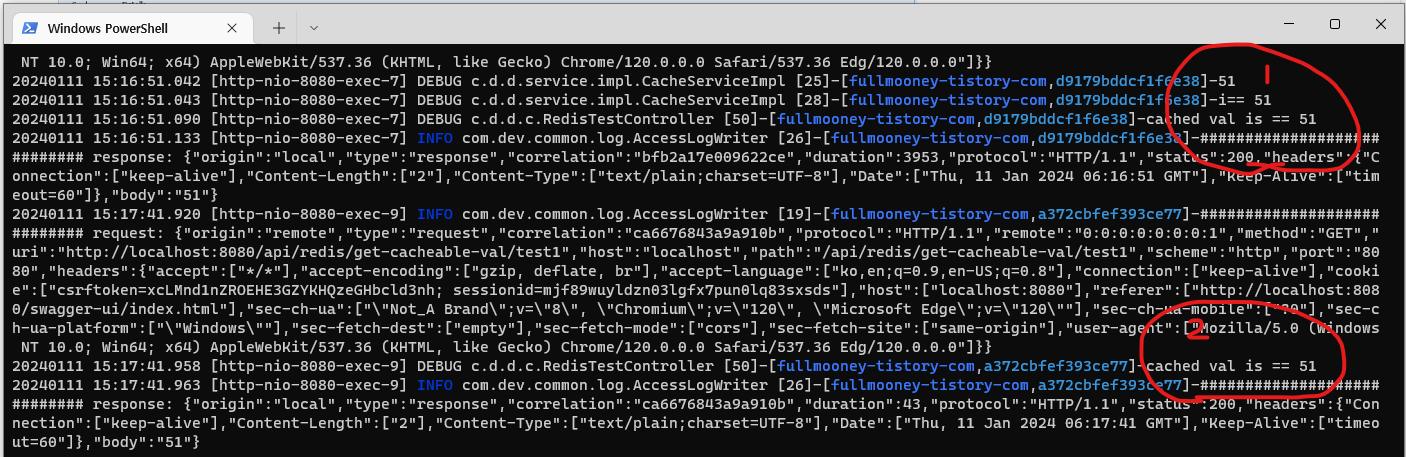
왜 서비스 콜이 안되는지 헤매는 상황을 방지하려면 RedisCacheConfig에서 entryTtl 설정을 적절하게 잘 설정할 필요가 있다.
Git: cache/redis-cacheable at dev · FullMooney/cache (github.com)
'개발 > java' 카테고리의 다른 글
| springboot resttemplate config 와 restClient 생성 (1) | 2024.01.19 |
|---|---|
| springboot rabbitmq config와 DLQ 예제 (0) | 2024.01.18 |
| springboot redis client 만들기 (1) | 2024.01.08 |
| Logbook 으로 access log 남기기 (2) | 2024.01.04 |
| mybatis interceptor 암복호화 처리 (1) | 2023.12.13 |