redis를 써보자
환경은 다음과 같다
- springboot 2.7.18
- jdk 11.0.21
먼저 pom 에 dependency를 추가한다.
<!-- pom.xml -->
<dependency>
    <groupId>org.springframework.boot</groupId>
    <artifactId>spring-boot-starter-data-redis</artifactId>
</dependency>

<dependency>
    <groupId>io.lettuce</groupId>
    <artifactId>lettuce-core</artifactId>
</dependency>
redis와 redisinsight 로컬 환경 구성(windows 기준)은 아래 게시글을 참조한다.
https://fullmooney.tistory.com/26
윈도우 PC에 redis + redis insight 구성
redis가 기본적으로는 windows 설치 버전을 제공하지 않으니 도커데스크톱으로 간단히 구성해본다. 환경은 다음과 같다. Windows 10 docker desktop 4.15.0 docker desktop으로 redis와 redis insight를 띄워보자. docker
fullmooney.tistory.com
부트로 가서 application.yml과 redis config 클래스를 작성한다.
# application.yml
spring:
  redis:
    url: localhost
    port: 6379
    password: fullmooney
    database: 0

lettuce:
  connect-timeout: 500
  command-timeout: 500
// RedisConfig.java
import java.time.Duration;

import org.springframework.beans.factory.annotation.Value;
import org.springframework.context.annotation.Bean;
import org.springframework.context.annotation.Configuration;
import org.springframework.data.redis.connection.RedisConnectionFactory;
import org.springframework.data.redis.connection.RedisStandaloneConfiguration;
import org.springframework.data.redis.connection.lettuce.LettuceClientConfiguration;
import org.springframework.data.redis.connection.lettuce.LettuceConnectionFactory;
import org.springframework.data.redis.core.RedisTemplate;
import org.springframework.data.redis.serializer.GenericJackson2JsonRedisSerializer;
import org.springframework.data.redis.serializer.StringRedisSerializer;

import io.lettuce.core.ClientOptions;
import io.lettuce.core.SocketOptions;
import lombok.extern.slf4j.Slf4j;

@Slf4j
@Configuration
public class RedisConfig {

    @Value("${spring.redis.url:localhost}")
    private String host;
    @Value("${spring.redis.port:6379}")
    private int port;
    @Value("${spring.redis.password}")
    private String password;
    @Value("${spring.redis.database:0}")
    private int database;

    @Value("${lettuce.connect-timeout:500}")
    private int connectTimeout;
    @Value("${lettuce.command-timeout:500}")
    private int commandTimeout;

    @Bean
    RedisConnectionFactory redisConnectionFactory() {
        try {
            RedisStandaloneConfiguration redisStandaloneConfiguration = new RedisStandaloneConfiguration();
            redisStandaloneConfiguration.setPort(port);
            redisStandaloneConfiguration.setHostName(host);
            redisStandaloneConfiguration.setPassword(password); // 패스워드 설정시
            redisStandaloneConfiguration.setDatabase(database);

            LettuceClientConfiguration clientConfiguration = LettuceClientConfiguration.builder()
              .clientOptions(
                  ClientOptions.builder()
                      .socketOptions(
                          SocketOptions.builder()
                              .connectTimeout(Duration.ofMillis(connectTimeout))
                              .build())
                      .build())
              .commandTimeout(Duration.ofMillis(commandTimeout))
              .build();

            LettuceConnectionFactory lettuceConnectionFactory = new LettuceConnectionFactory(redisStandaloneConfiguration, clientConfiguration);

            lettuceConnectionFactory.afterPropertiesSet();
            lettuceConnectionFactory.setValidateConnection(false);

            return lettuceConnectionFactory;
        } catch(Exception e) {
            log.error("", e);
            return null;
        }
    }

    @Bean
    RedisTemplate<String, Object> redisTemplate() {
        try {
            RedisTemplate<String, Object> redisTemplate = new RedisTemplate<>();
            redisTemplate.setConnectionFactory  (redisConnectionFactory());
            redisTemplate.setKeySerializer      (new StringRedisSerializer());
            redisTemplate.setValueSerializer    (new GenericJackson2JsonRedisSerializer());
            redisTemplate.setHashKeySerializer  (new StringRedisSerializer());
            redisTemplate.setHashValueSerializer(new StringRedisSerializer());

            return redisTemplate;
        } catch(Exception e) {
            log.error("redisTemplate Exception", e);
        }
        return null;
    }
}
exception 발생시 영향이 없도록 logging만 하고 넘긴다.
그리고 redis client 추상화 클래스를 작성해본다.
//AbstractRedisClient.java
import java.util.Set;

import org.springframework.data.redis.core.RedisTemplate;
import org.springframework.data.redis.core.ValueOperations;

abstract class AbstractRedisClient {

    protected final RedisTemplate<String, Object> redisTemplate;
    protected final ValueOperations<String, Object> valueOperations;

    AbstractRedisClient(RedisTemplate<String, Object> redisTemplate) {
        if (redisTemplate != null) {
            this.redisTemplate = redisTemplate;
            this.valueOperations = redisTemplate.opsForValue();
        } else {
            this.redisTemplate = null;
            this.valueOperations = null;
        }
    }

    public abstract void setValue(String key, Object value);
    public abstract void setValue(String key, Object value, int expireSeconds);
    public abstract <T> T getValue(String key);
    public abstract void deleteValue(String key);
    public abstract ValueOperations<String, Object> getValueOperations(); // expired time 설정에 필요
    public abstract Set<String> getKeys(String pattern);

}
그리고 이를 구현하는 RedisClient 클래스를 생성한다.
//CommonRedisClient.java
import java.util.HashSet;
import java.util.Set;
import java.util.concurrent.TimeUnit;

import org.springframework.data.redis.core.RedisTemplate;
import org.springframework.data.redis.core.ValueOperations;
import org.springframework.lang.Nullable;
import org.springframework.stereotype.Component;

import lombok.extern.slf4j.Slf4j;

@Slf4j
@Component
public class CommonRedisClient extends AbstractRedisClient {

    CommonRedisClient(@Nullable RedisTemplate<String, Object> redisTemplate) {
	super(redisTemplate);
    }

    @Override
    public void setValue(String key, Object value) {
	try {
        valueOperations.set(key, value);
        valueOperations.getOperations().expire(key, 1, TimeUnit.HOURS); // default 1시간 alive
	} catch (Exception e) {
	    log.error("CommonRedisClient.setValue Exception[{}]", e.getMessage());
	    log.error("CommonRedisClient.setValue Exception[{}]", e.toString());
	}
    }

    @Override
    public void setValue(String key, Object value, int expireSeconds) {
	try {
	    valueOperations.set(key, value);
	    valueOperations.getOperations().expire(key, expireSeconds, TimeUnit.SECONDS); // custom expired time of seconds
	} catch (Exception e) {
	    log.error("CommonRedisClient.setValue Exception[{}]", e.getMessage());
	    log.error("CommonRedisClient.setValue Exception[{}]", e.toString());
	}
    }

    @Override
    @SuppressWarnings("unchecked")
    public <T> T getValue(String key) {
	T object = null;

	try {
	    if (Boolean.TRUE.equals(valueOperations.getOperations().hasKey(key))) {
		object = (T) valueOperations.get(key);
	    }
	} catch (Exception e) {
	    log.error("CommonRedisClient.getValue Exception[{}]", e.getMessage());
	    log.error("CommonRedisClient.getValue Exception[{}]", e.toString());
	}

	return object;
    }

    @Override
    public void deleteValue(String key) {
	try {
	    valueOperations.getOperations().delete(key);
	} catch (Exception e) {
	    log.error("CommonRedisClient.deleteValue Exception[{}]", e.getMessage());
	    log.error("CommonRedisClient.deleteValue Exception[{}]", e.toString());
	}
    }

    @Override
    public ValueOperations<String, Object> getValueOperations() {
	return valueOperations;
    }

    @Override
    public Set<String> getKeys(String pattern) {
	try {
	    return redisTemplate.keys(pattern);
	} catch (Exception e) {
	    log.error("CommonRedisClient.getKeys Exception[{}]", e.getMessage());
	    log.error("CommonRedisClient.getKeys Exception[{}]", e.toString());
	}

	return new HashSet<>();
    }

}
이제 테스트 해보자.
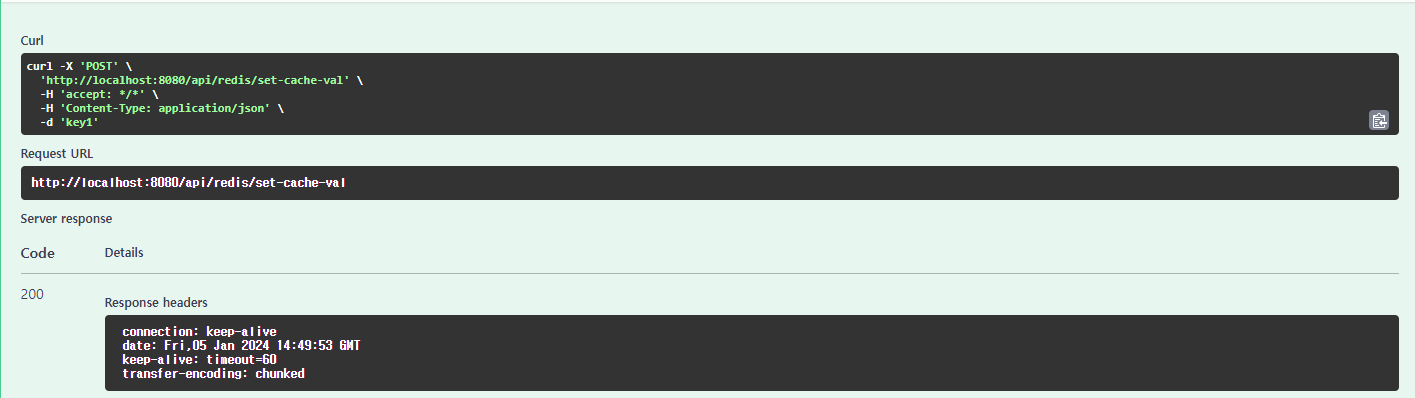
임의의 키를 입력받아 100 을 value로 set하고 다시 동일 key로 값을 조회해본다.
//RedisTestController.java
import org.springframework.http.HttpStatus;
import org.springframework.http.ResponseEntity;
import org.springframework.web.bind.annotation.GetMapping;
import org.springframework.web.bind.annotation.PathVariable;
import org.springframework.web.bind.annotation.PostMapping;
import org.springframework.web.bind.annotation.RequestBody;
import org.springframework.web.bind.annotation.RequestMapping;
import org.springframework.web.bind.annotation.RestController;

import com.dev.common.client.CommonRedisClient;


@RestController
@RequestMapping("/api/redis")
public class RedisTestController {

    private final CommonRedisClient redisClient;

    RedisTestController(CommonRedisClient redisClient) {
	this.redisClient = redisClient;
    }

    @PostMapping("/set-cache-val")
    public ResponseEntity<Void> setCacheVal(@RequestBody String key) {

	redisClient.setValue(key, "100", 60); // 입력된 key에 대해 60초 동안 유효한 value 100 set

	return ResponseEntity.status(HttpStatus.OK).build();
    }

    @GetMapping("/get-cache-val/{key}")
    public ResponseEntity<String> getCacheVal(@PathVariable(name = "key") String key) {

	String val = (String) redisClient.getValue(key);

	return ResponseEntity.ok(val);
    }

}
swagger 실행결과 잘 동작함을 확인가능하다.

redis insight에서도 확인된다.

이어서 @Cacheable 사용 설정을 해보자.
https://fullmooney.tistory.com/28
springboot + redis @Cacheable 사용
redis @cacheable를 써보자 환경은 다음과 같다 springboot 2.7.18 jdk 11.0.21 잘 변하지 않는 데이터에 대해서 @Cacheable을 통해 DB , API호출이나 로직 수행을 하지 않고, redis cache에 저장된 값으로 즉각적으로
fullmooney.tistory.com
'개발 > java' 카테고리의 다른 글
| springboot rabbitmq config와 DLQ 예제 (0) | 2024.01.18 |
|---|---|
| springboot + redis @Cacheable 사용 (3) | 2024.01.11 |
| Logbook 으로 access log 남기기 (2) | 2024.01.04 |
| mybatis interceptor 암복호화 처리 (1) | 2023.12.13 |
| JPA EntityListener로 multi JpaRepository save (1) | 2022.09.07 |