이번에는 kubeedge에 발을 살짝 담가 온도 측정 해보려 한다.
kubeedge 는 CNCF landscape 에서 Provisioning 하위의 Automation & Configuration에 CNCF Graduated로 표시되고 있다.
프로덕션 환경에서 사용해도 될만한 기술이라는 건데 argocd, prometheus, istio, fluentd 등이 다 graduated에 해당되니 안심하고 쓰자.

KubeEdge is an open source system extending native containerized application orchestration and device management to hosts at the Edge.
라고 설명되어 있고, Edge Computing, Simplified development, Kubernetes-native support, Abundant applications 가 장점으로 표시되고 있는데 이중에서도 Kubernetes-native support 가 맘에 들었다.
IaaS 의 vm들을 관리할 수 있다는거 = 럭키 !
설치
모든 구성 순서는 사실 여기에 잘나와있다.
https://release-1-20.docs.kubeedge.io/docs/setup/install-with-keadm
Installing KubeEdge with Keadm | KubeEdge
Keadm is used to install the cloud and edge components of KubeEdge. It does not handle the installation of Kubernetes and its runtime environment.
kubeedge.io
영어이지만 브라우저에서 자동 번역도 있고, gpt를 통해서도 할 수 있지만 그 마저도 귀찮은 사람들을 위해 정리한다.
0. 환경
내 환경을 우선 설명하자면, 공유기에 연결된 2대의 ubuntu가 설치된 미니PC로 k8s를 구성하고, kubesphere 를 추가로 올렸다.
k8s 에 istio 설치하였고, 마스터노드에 nginx를 추가로 설치하여 리버스프록시를 구성했다.
도메인과 인증서를 구성하여 nginx와 istio에 각각 설정했다.
공유기에서는 포트포워딩을 통해 ssh, https 와 10001~10005까지의 포트를 k8s 마스터노드의 노드포트로 포워딩 했다.
대상 mini pc(이하 엣지pc)는 공유기가 아닌 랜선을 직접 연결하여 공유기와 public IP 가 다르고, ubuntu에 docker engine을 올린 뒤, containerd로 마이그레이션 하였다.
1. keadm 설치
k8s 마스터노드와 엣지pc에 keadm을 설치한다.
2025.03.15기준 v1.20.0 이 최신이므로 이걸로 깔아준다.
$ wget https://github.com/kubeedge/kubeedge/releases/download/v1.20.0/keadm-v1.20.0-linux-amd64.tar.gz
$ tar -zxvf keadm-v1.20.0-linux-amd64.tar.gz
$ cp keadm-v1.20.0-linux-amd64/keadm/keadm /usr/local/bin/keadm
$ keadm

    +----------------------------------------------------------+
    | KEADM                                                    |
    | Easily bootstrap a KubeEdge cluster                      |
    |                                                          |
    | Please give us feedback at:                              |
    | https://github.com/kubeedge/kubeedge/issues              |
    +----------------------------------------------------------+

    Create a cluster with cloud node
    (which controls the edge node cluster), and edge nodes
    (where native containerized application, in the form of
    pods and deployments run), connects to devices.

Usage:
  keadm [command]

Examples:

    +----------------------------------------------------------+
    | On the cloud machine:                                    |
    +----------------------------------------------------------+
    | master node (on the cloud)# sudo keadm init              |
    +----------------------------------------------------------+

    +----------------------------------------------------------+
    | On the edge machine:                                     |
    +----------------------------------------------------------+
    | worker node (at the edge)# sudo keadm join <flags>       |
    +----------------------------------------------------------+

    You can then repeat the second step on, as many other machines as you like.


Available Commands:
  batch       Batch process nodes using a config file
  completion  Generate the autocompletion script for the specified shell
  config      Use this command to configure keadm
  ctl         Commands operating on the data plane at edge
  debug       debug function to help diagnose the cluster
  deprecated  keadm deprecated command
  gettoken    To get the token for edge nodes to join the cluster
  help        Help about any command
  init        Bootstraps cloud component. Checks and install (if required) the pre-requisites.
  join        Bootstraps edge component. Checks and install (if required) the pre-requisites. Execute it on any edge node machine you wish to join
  manifest    Checks and generate the manifests.
  reset       Teardowns KubeEdge (cloud(helm installed) & edge) component
  rollback    rollback edge component. Rollback the edge node to the desired version.
  upgrade     Upgrade components of the cloud or the edge
  version     Print the version of keadm

Flags:
  -h, --help      help for keadm
  -v, --v Level   number for the log level verbosity

Additional help topics:
  keadm beta       keadm beta command

Use "keadm [command] --help" for more information about a command.
2. master node
port-fowarding
U+ 기준으로는 http://192.168.219.1/web/intro.html 이런 경로에 접근하여 로그인하면 설정 가능하다.
10000 번과 , 10002번 포트가 엣지노드에서 접근할 수 있어야한다고 써져있다.
포트포워딩을 통해 노드포트로 접근할 수 있도록 해주자.나는 쓸일이 있을가봐 이것저것 미리 해놨었는데 저 두개 포트만 TCP로 연결 되면 되는것 같다.

keadm init
keadm init을 하자. kubeedge 네임스페이와 함께 몇몇 리소스가 배포가 되는 것을 볼 수 있다.
$ # advertise-address 에 들어갈 real ip 를 모르면 curl ifconfig.me 커맨드를 실행해본다.
$ keadm init --advertise-address=211.x.x.x --kubeedge-version=v1.20.0 --kube-config=$HOME/.kube/config
$ kubectl edit svc cloudcore -n kubeedge
$ # 그리고 cloudcore 서비스의 타입을 NodePort로 변경한다.
$  kubectl get svc -n kubeedge
NAME        TYPE       CLUSTER-IP      EXTERNAL-IP   PORT(S)                                                                           AGE
cloudcore   NodePort   10.107.128.15   <none>        10000:30003/TCP,10001:31434/UDP,10002:31246/TCP,10003:30004/TCP,10004:30005/TCP   12h
이제 토큰을 확인한다.
$ keadm gettoken --kube-config $HOME/.kube/config
$ # 토큰이 출력된다.
f7f6fdad27548955c70533e63b5c197ca5038a35b4282f21d9c5a811479b5266.eyJhbGciOiJIUzI1NiIsInR5cCI6IkpXVCJ9.eyJleHAiOjE3NDIzMDAzNDh9.8cZy0H5WAxW1odtfOItKMTewy6FKtuuuMu5or8FH8q8
3. edge node
join
keadm 을 통해 join을 한다.
sudo keadm join --cloudcore-ipport=<마스터노드 리얼IP>:10000 --token=<keadm gettoken으로 획득한 토큰> --kubeedge-version=v1.20.0
혹시나
E0315 15:46:11.778655 190264 remote_runtime.go:193] "RunPodSandbox from runtime service failed" err="rpc error: code = Unknown desc = failed to create containerd task: failed to create shim task: OCI runtime create failed: runc create failed: expected cgroupsPath to be of format \"slice:prefix:name\" for systemd cgroups,
이런 에러가 나면, SystemCgroup 을 false로 변경하고 다시 해보자.
$ sudo vi /etc/containerd/config.toml
$ #  SystemdCgroup = true -->  SystemdCgroup = false
$ sudo systemctl restart containerd
$ sudo systemctl status containerd
$ sudo systemctl restart docker
다시 join하면 성공
$ sudo keadm join --cloudcore-ipport=<마스터노드리얼IP>:10000 --token=<내토큰> --kubeedge-version=v1.20.0
I0315 21:40:58.108512  374255 join.go:73] 1. Check KubeEdge edgecore process status
I0315 21:40:58.117900  374255 join.go:82] 2. Check if the management directory is clean
I0315 21:40:58.117931  374255 join.go:97] 3. Check if the node name is valid
I0315 21:40:58.155591  374255 join_others.go:193] 4. Create the necessary directories
I0315 21:40:58.164895  374255 image.go:38] 5. Pull Images
Pulling kubeedge/installation-package:v1.20.0 ...
Successfully pulled kubeedge/installation-package:v1.20.0
I0315 21:40:58.165842  374255 image.go:43] 6. Copy resources from the image to the management directory
I0315 21:40:58.763951  374255 join_others.go:204] 7. Generate systemd service file
I0315 21:40:58.764362  374255 join_others.go:225] 8. Generate EdgeCore default configuration
I0315 21:40:58.764398  374255 join_others.go:121] The configuration does not exist or the parsing fails, and the default configuration is generated
W0315 21:40:58.766098  374255 validation.go:71] NodeIP is empty , use default ip which can connect to cloud.
I0315 21:40:58.769137  374255 join_others.go:230] 9. Run EdgeCore daemon
I0315 21:40:59.314891  374255 join_others.go:290]
I0315 21:40:59.314917  374255 join_others.go:291] KubeEdge edgecore is running, For logs visit: journalctl -u edgecore.service -xe
I0315 21:41:09.324281  374255 join_others.go:250] 10. Install Complete!
4. 확인
마스터노드로 들어가본다.
# edgenode hostname 대로 node에 하나 추가됐다. 내 경우 worker-node1
$ kubectl get node
NAME           STATUS   ROLES           AGE    VERSION
master-node    Ready    control-plane   297d   v1.28.12
worker-node1   Ready    agent,edge      2m5s   v1.30.7-kubeedge-v1.20.0
worker-node2   Ready    <none>          283d   v1.28.12
taint
daemonset이 자동으로 추가된 워커노드에 대해 파드배포를 하려고 하니, taint설정을 해주고 NodeSelector에도 관련 내용을 업데이트해준다. (나처럼 kubesphere를 쓰는 경우 매트릭 수집관련한 것들은 예외로 해야하니 좀 번거롭긴하다.)
일단 아래는 kubesphere없다는 가정으로
$ kubectl taint nodes worker-node1 node-role.kubernetes.io/edge=:NoSchedulespec:
template:
spec:
nodeSelector:
kubernetes.io/os: linux
node-role.kubernetes.io/edge: "false" # 엣지 노드가 아닌 곳에만 배포
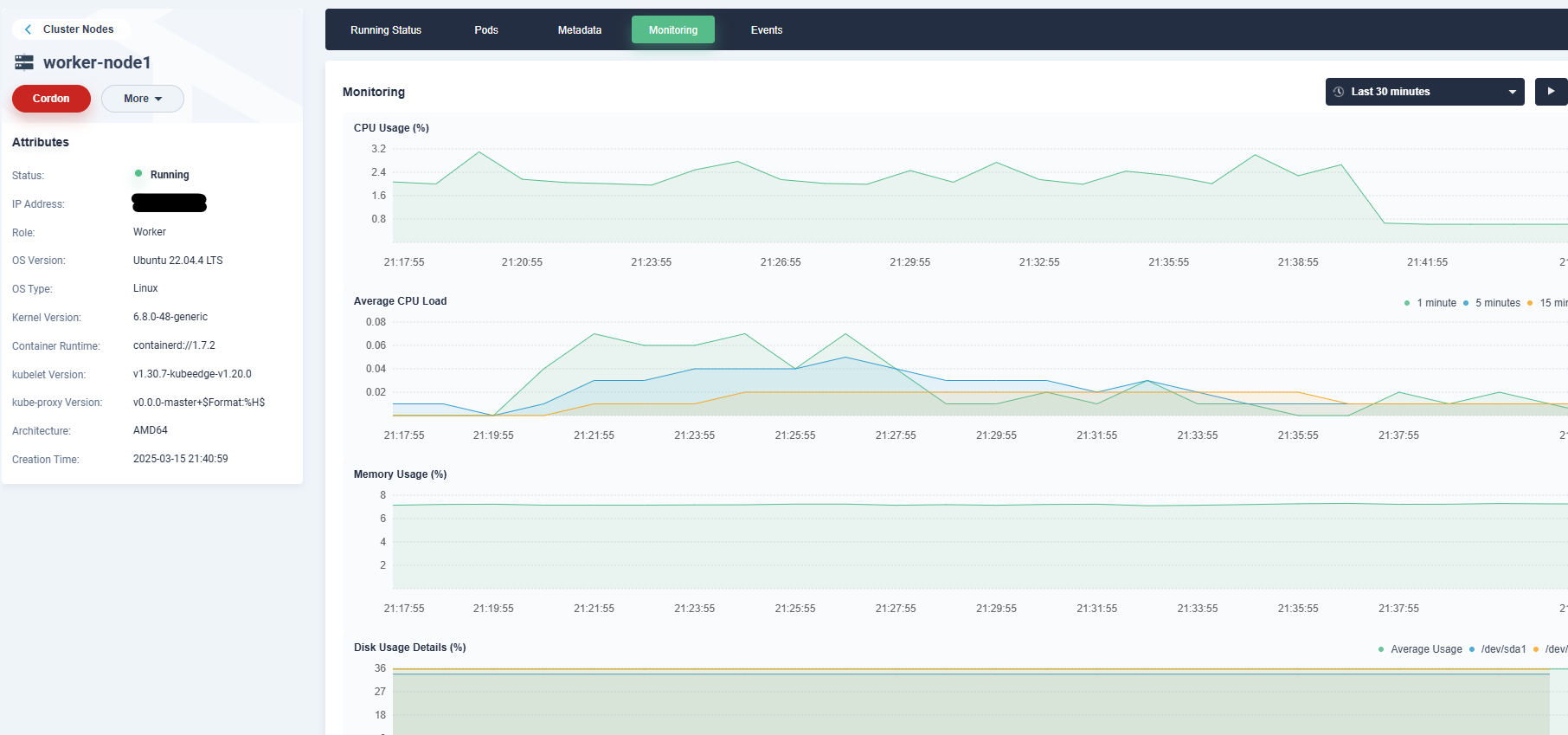
kubesphere에서 확인해보자. (기록을 위해 한번 지우고 다시 연결해서 매트릭과 생성시간이 좀 안맞다 캡처는)
추가한 edge node인 worker-node1 리얼아이피로 확인되고,
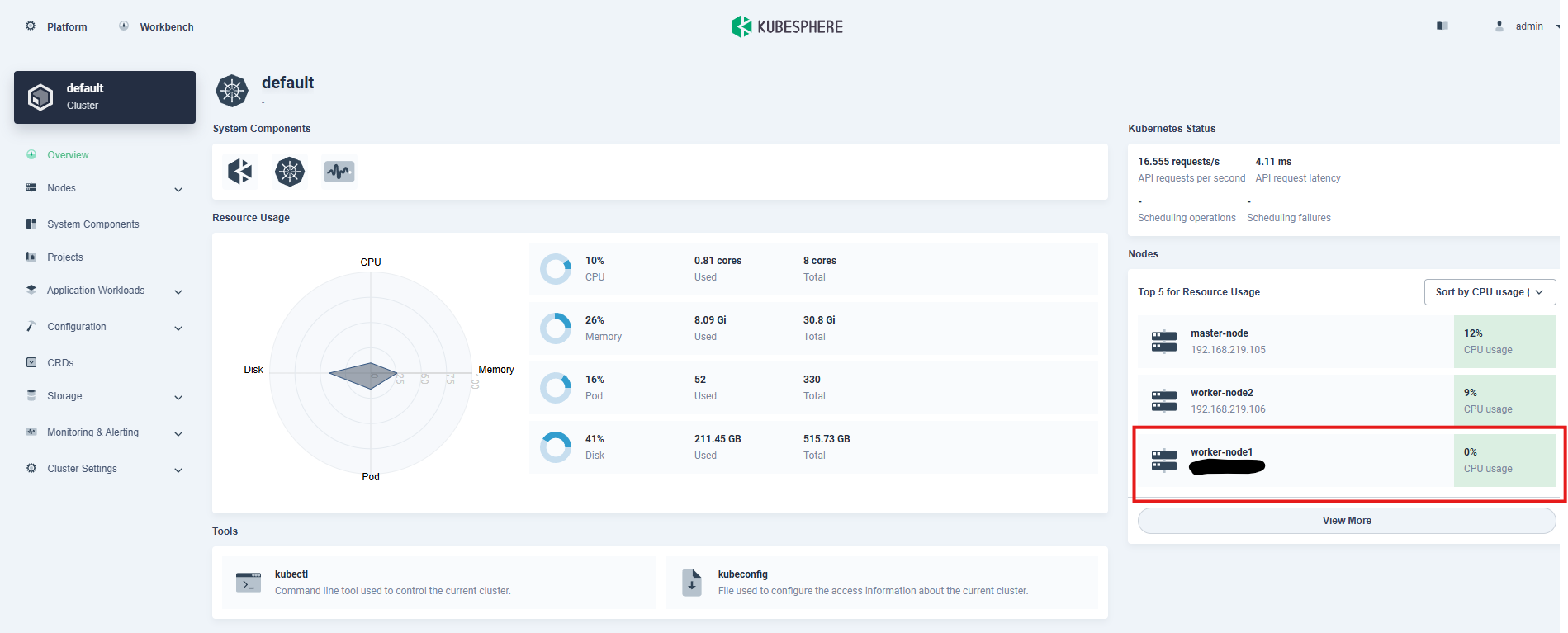
클릭해서 들어가보면 상세 정보 조회와

모니터링도 잘 되는 걸로 보인다..
5. edge node 떼기
edge node에서 reset 후 남아있는 파일들을 지워준다.
$ sudo keadm reset
WARNING: 'keadm reset' is no longer supported after version v1.22.
You must use the third-level command 'keadm reset cloud' or 'keadm reset edge'.
W0315 21:38:00.535446  373913 common_others.go:100] failed to check cloudcore is running: failed to create KubeClient, error: get kube config failed with error: stat /root/.kube/config: no such file or directory
[reset] WARNING: Changes made to this host by 'keadm init' or 'keadm join' will be reverted.
[reset] Are you sure you want to proceed? [y/N]: y
Static pod directory has been removed!
edgecore is stopped
$ sudo rm -rf /etc/kubeedge/
$ sudo rm -rf /var/lib/kubeedge/
그리고 마스터노드에서는 추가되었던 node를 kubectl delete node worker-node1과 같이 커맨드로 삭제해준다.
'CloudNative > Provisioning' 카테고리의 다른 글
| trivy (1) | 2024.12.20 |
|---|---|
| vault (1) | 2024.11.23 |
| nexus cli file upload (0) | 2024.10.25 |
| nexus gradle repository (1) | 2024.10.18 |
| jupyterhub + nexus pypi repository (1) | 2024.04.26 |